// mykavo for wordpress //
Update WordPress
without fear.
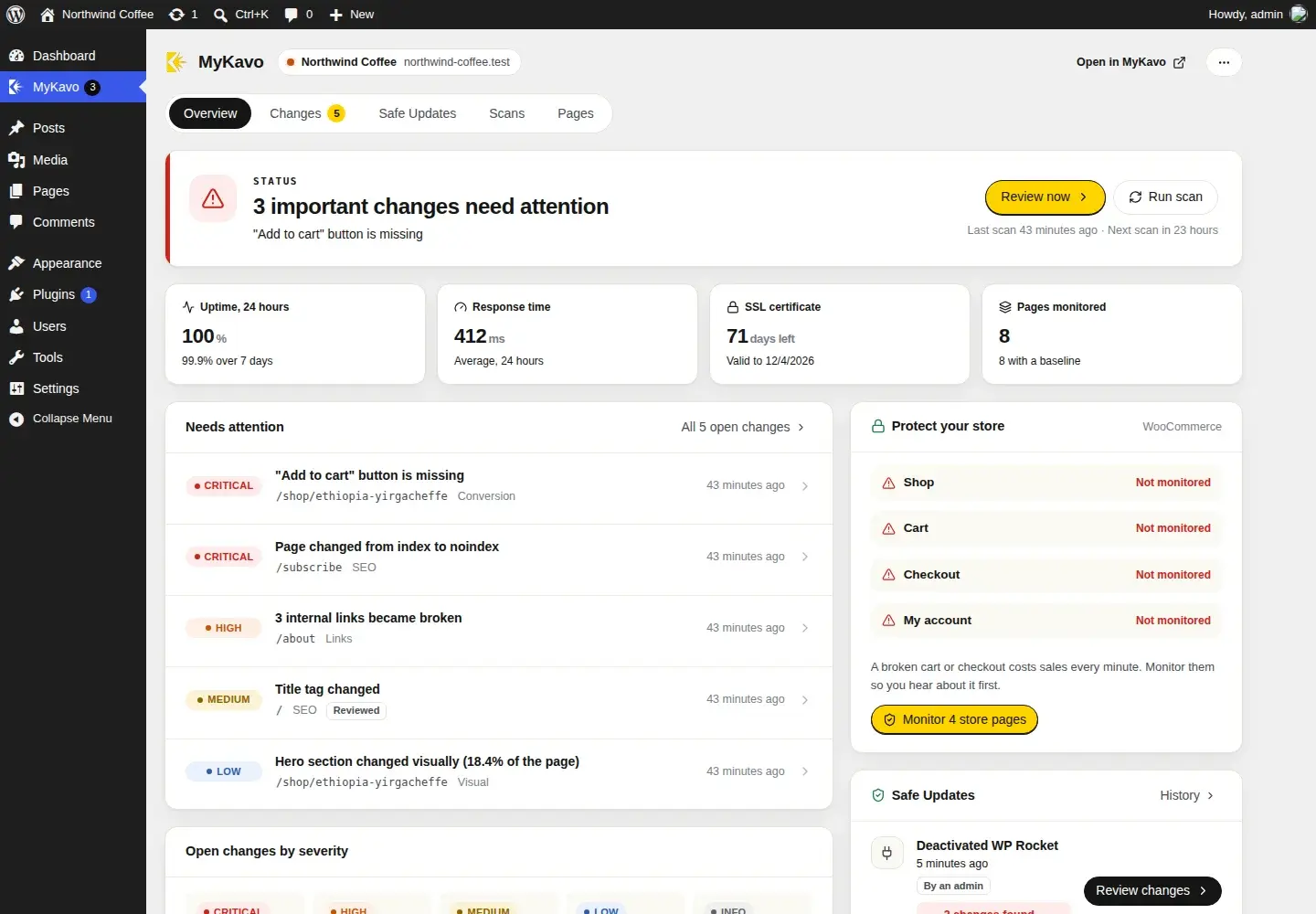
The MyKavo plugin checks your pages after every plugin, theme and WordPress update - and whenever a plugin is switched on or off - then tells you whether anything broke, and exactly which change did it. All inside wp-admin, with nothing added to the pages your visitors load.
Free plugin · WordPress 6.2 to 7.1 · PHP 7.4+ · GPL
// built to never slow your site down //
Plugins get deleted for being slow.
This one costs your visitors nothing.
0
scripts or styles on your public pages
0
database queries when visitors load a page
0
autoloaded options
0
cron jobs or custom tables
// safe updates //
Know which update
broke it.
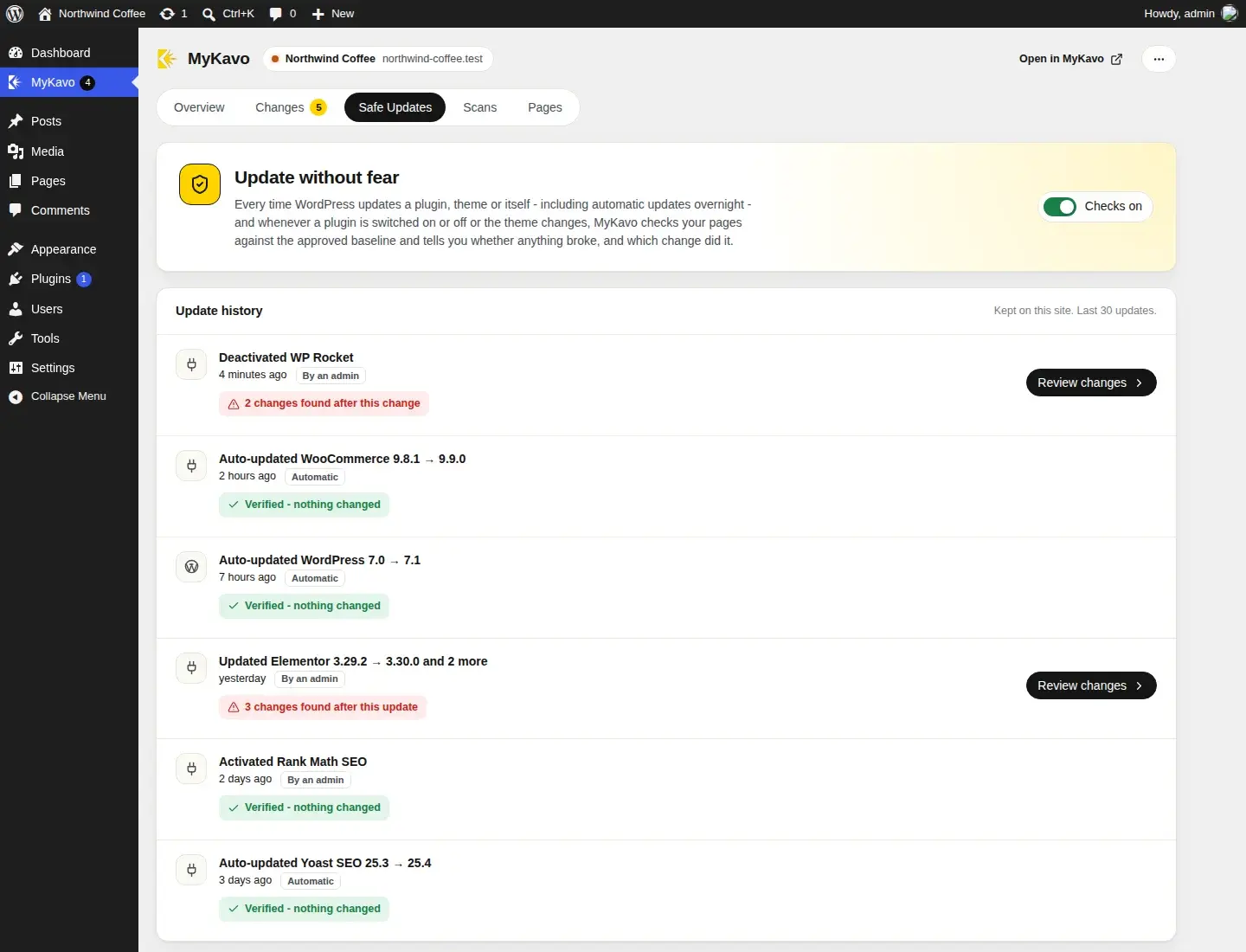
Updates are the most common way a WordPress site breaks, and the hardest part is working out which one did it. Safe Updates answers that the moment the update finishes.
- Every plugin, theme, WordPress and translation update is checked - including automatic updates that run overnight.
- Switching a plugin on or off, or changing the theme, is checked too. Those break sites as often as updates.
- A plain verdict: “Verified - nothing changed”, or “3 changes found after this update” with the evidence one click away.
- Every change found afterwards is labelled with the update it appeared after, so you know where to look.
- The Plugins screen warns you before you update a plugin whose last update changed your site.
Automatic checks come with Pro and Agency. On Free, every update is still listed.
// on the plugins screen //

// the evidence //
See exactly what changed.
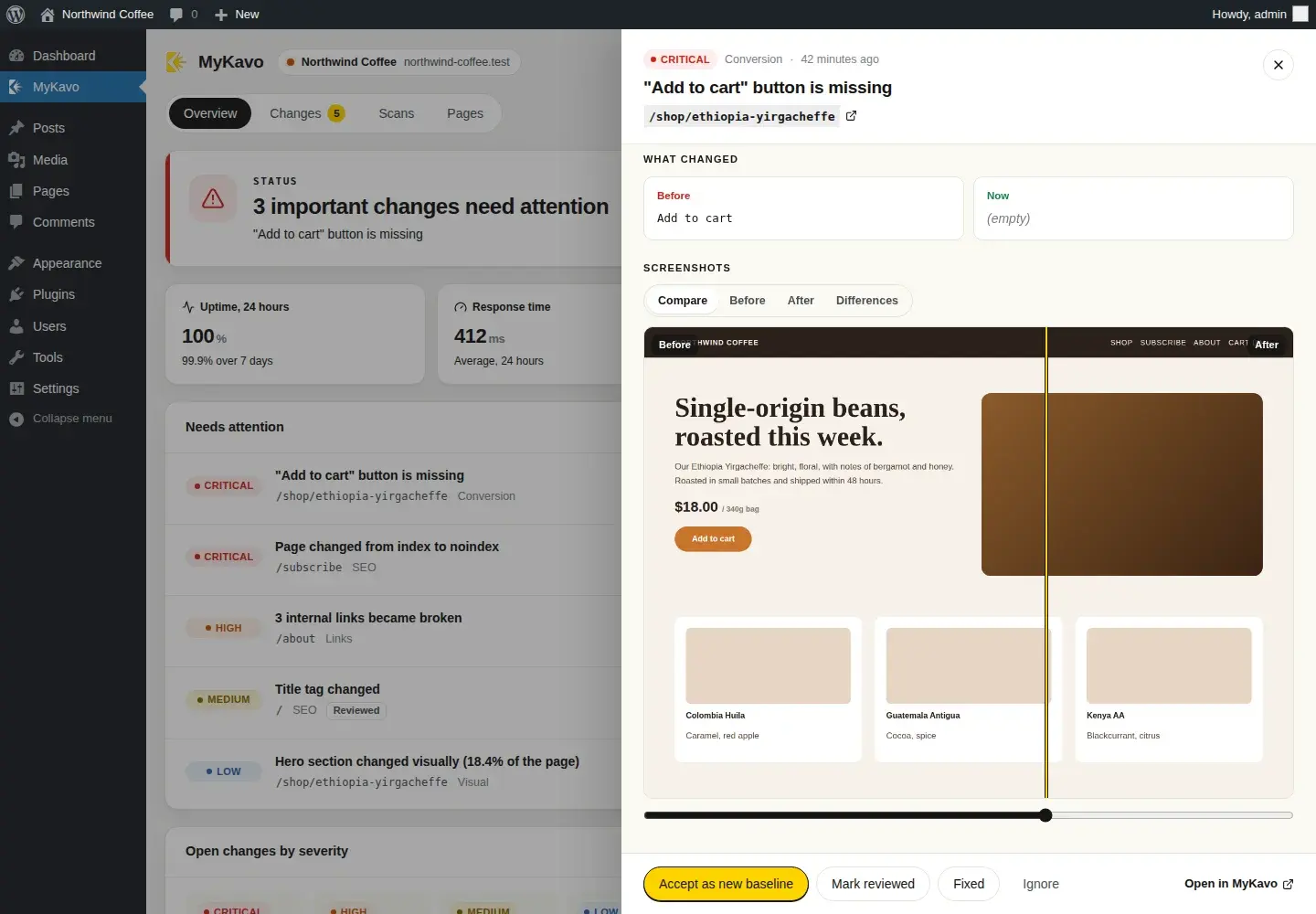
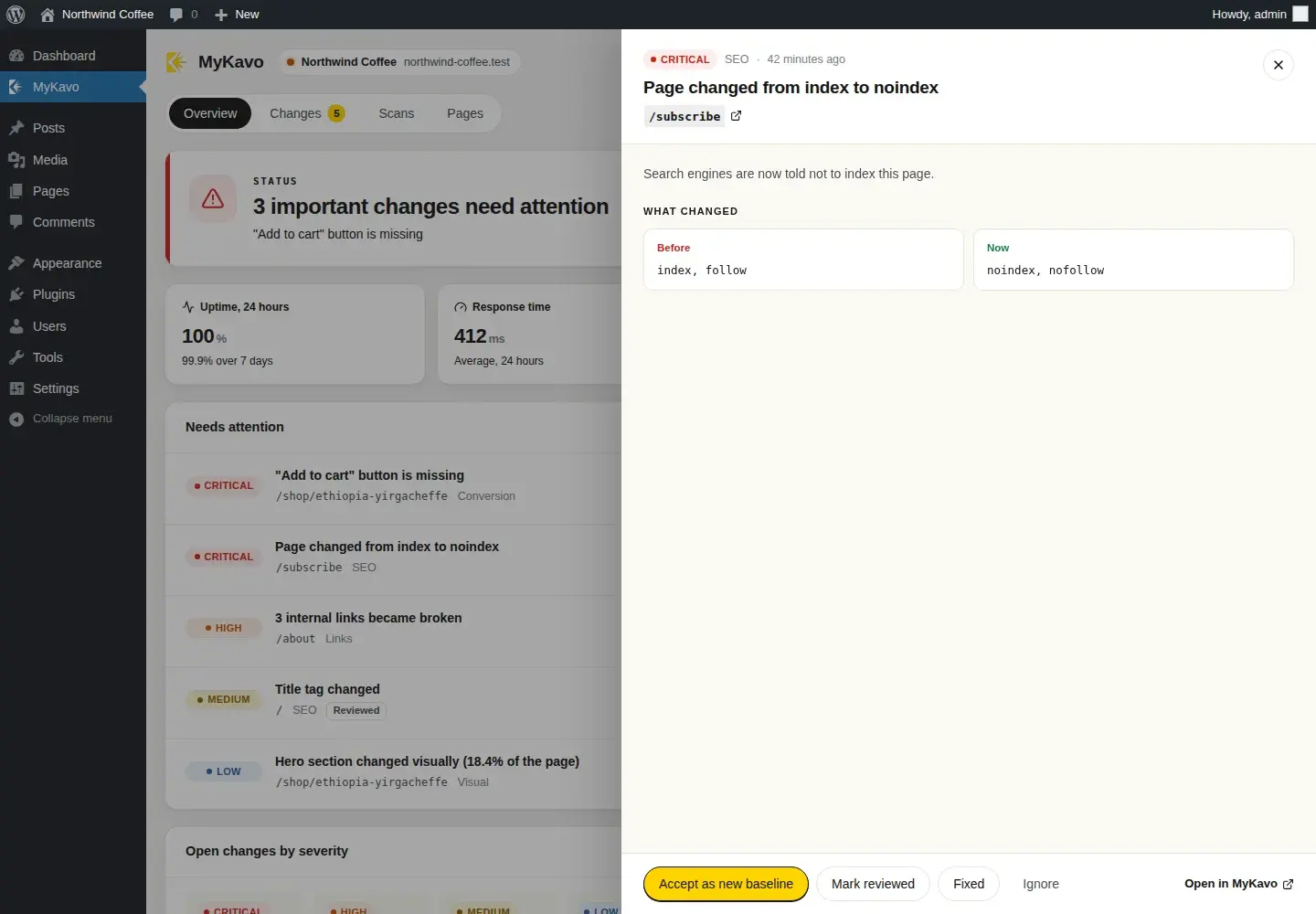
Every change is ranked Critical to Info, with the old and new version side by side - the screenshots, and the exact values: title, meta description, robots tag, canonical, button text and more.
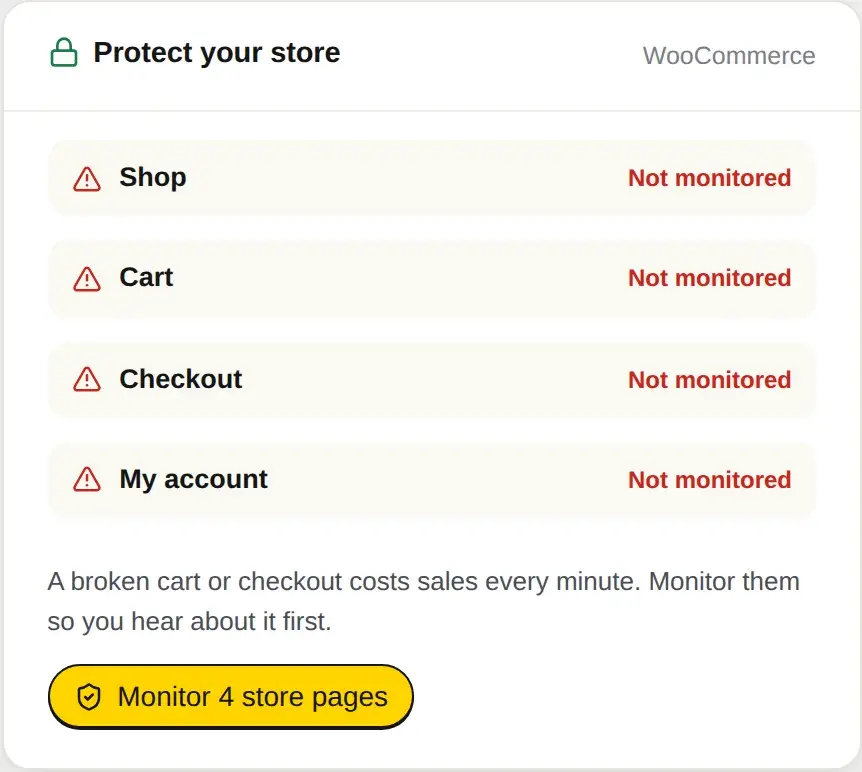
// for woocommerce stores //
A broken checkout
costs sales every minute.
With WooCommerce active, the plugin shows whether your Shop, Cart, Checkout and My account pages are monitored, and adds the missing ones in one click. If an update hides the checkout button or breaks the cart, you hear about it first.
// in wp-admin //
Everything in the dashboard,
right where you work.
One-click decisions
Accept an intentional change as the new baseline, mark it fixed, or ignore it, without leaving WordPress.
Monitor with MyKavo
A link under every published page and post adds it to monitoring. Or paste any address on the Pages tab.
Site Health
MyKavo's status appears in Tools → Site Health, with a MyKavo section in the Info tab for support requests.
Badge and dashboard widget
The admin menu shows how many important changes are waiting. A small Dashboard widget shows the status.
Scan on demand
Run a scan from wp-admin and watch the progress live. Manual scans come with Pro and Agency.
Uptime, speed and SSL
Uptime over 24 hours and 7 days, average response time and days until the certificate expires, at a glance.
// wp-cli //
Update everything.
Wait for the verdict.
For agencies that script their maintenance runs. wp mykavo scan --wait exits with an error when something important changed, so a broken update stops the run instead of reaching the client.
- wp mykavo status
- Status, open changes and next scan
- wp mykavo changes
- Changes as a table, JSON or CSV
- wp mykavo scan --wait
- Scan now; exits with an error if something important changed
- wp mykavo monitor <url>
- Start monitoring pages
- wp mykavo updates
- Recent updates and their verdicts
$ wp plugin update --allSuccess: Updated 3 of 3 plugins.$ wp mykavo scan --waitScan scn_8f3k2 started.5 of 12 pages checked...Success: Verified - nothing changed.
The performance contract
- On a visitor's request the plugin only registers hooks. Nothing loads until WordPress updates something, switches a plugin, or an administrator opens a MyKavo screen.
- Assets load on the MyKavo screen alone, built on scripts WordPress already ships.
- Remote calls happen only while an administrator is looking, cached and time-limited - or once, right after an update.
- Screenshots load from MyKavo straight into your browser through signed, expiring links, never through your server.
- Scanning runs on MyKavo's servers, the same way a visitor loads your pages.
Secure by design
- Connecting uses an OAuth-style approval with PKCE. You approve on mykavo.app; nothing to copy and paste.
- Your site receives a key that works for that one website only. The key stays on your server - the browser never sees it.
- Only administrators can see or act on monitoring.
- Disconnect at any time, from WordPress or from your MyKavo account. Deleting the plugin removes everything it stored.
- Nothing about your visitors is ever collected or sent.
// set up in two minutes //
Install. Connect. Done.
Install
Download the zip, then in WordPress go to Plugins → Add New → Upload Plugin and activate it.
Connect
Open MyKavo in the admin menu and press Connect. Sign in or create a free account, choose the website, approve.
Update without fear
The next update is checked automatically. The verdict shows in WordPress, and by email or Slack if you switch those alerts on.
// pricing //
The plugin is free. So is MyKavo, to start.
Free
$0 / month
- WordPress plugin
- Websites
- 1
- Pages per website
- 5
- Scans
- Weekly
- Safe Updates checks
- -
- Scan from WordPress
- -
- White-label client reports
- -
Pro
$20 / month
- WordPress plugin
- Websites
- 8
- Pages per website
- 15
- Scans
- Daily
- Safe Updates checks
- Scan from WordPress
- White-label client reports
- -
Agency
$49 / month
- WordPress plugin
- Websites
- 30
- Pages per website
- 25
- Scans
- Daily
- Safe Updates checks
- Scan from WordPress
- White-label client reports
Every plan, side by side, on the pricing page.
// faq //
Plugin questions.
Will the plugin slow down my website?
No. It adds nothing to the pages your visitors load: no scripts, no styles, no database queries and no remote requests. It stores no autoloaded options and runs no cron jobs. Everything it does happens inside wp-admin or right after WordPress updates something, and the scanning itself runs on MyKavo's servers.
Is the plugin free?
Yes. The plugin is free on every plan, and MyKavo has a free plan: one website, five monitored pages and weekly scans, with no card required. Safe Updates - the automatic check after every update - and on-demand scans are part of the Pro ($20/month) and Agency ($49/month) plans. On Free, every update is still listed so you know what changed and when.
How does it know which update broke something?
WordPress tells the plugin what it is updating and the versions before and after. The plugin sends that list to MyKavo when the update finishes, and MyKavo scans your monitored pages against their approved baseline right away. Anything that changed is recorded with that update attached, so each change says which update it appeared after.
Does it work with WooCommerce, Elementor and my theme?
Yes. MyKavo checks the rendered pages your visitors see, so it works with any theme, page builder or plugin. With WooCommerce active, the plugin also shows whether your Shop, Cart, Checkout and My account pages are monitored and adds the missing ones in one click.
Is it on WordPress.org?
It is on its way to the WordPress.org plugin directory. Until it is listed, download it here and upload it under Plugins → Add New → Upload Plugin. It is the same plugin, released under the GPL.
What does the plugin send to MyKavo?
Only what it needs: your site's address when you connect, the names and version numbers of what was updated or switched on or off, the addresses of pages you choose to monitor, and the actions you take in the MyKavo screen. Nothing about your visitors is ever sent.
Can I use it from the command line?
Yes. With WP-CLI, `wp mykavo scan --wait` runs a scan and waits for the verdict, exiting with an error if something important changed - handy right after `wp plugin update --all`. Other commands show the status, list changes, add pages and list recent updates.
What versions of WordPress and PHP does it support?
WordPress 6.2 or newer, tested up to 7.1, on PHP 7.4 or newer. Each site in a multisite network connects on its own.
The next update is already on its way.
Install the plugin before it lands, and find out what it changed the moment it does.